
 LEAF MEMBERSHIP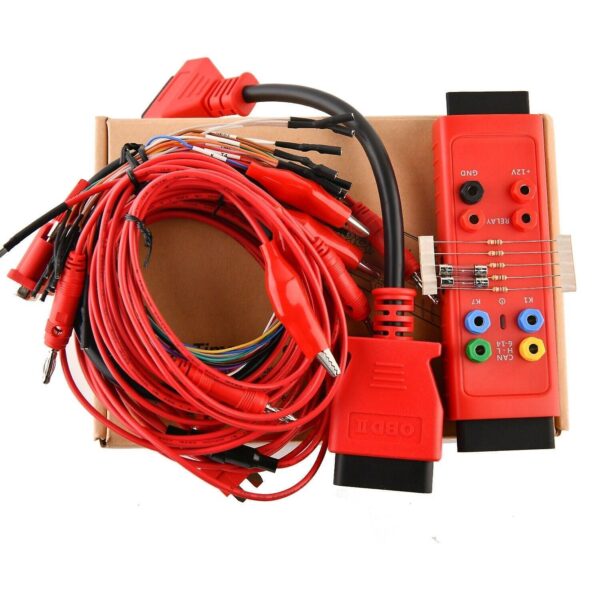
Autel G-Box2 Auto Smart Key Programming IMMO Scanner for Mercedes-Benz
$ 91.17
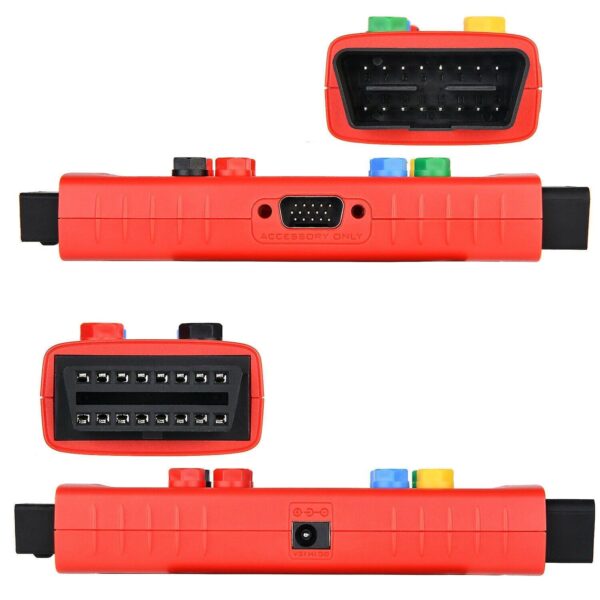
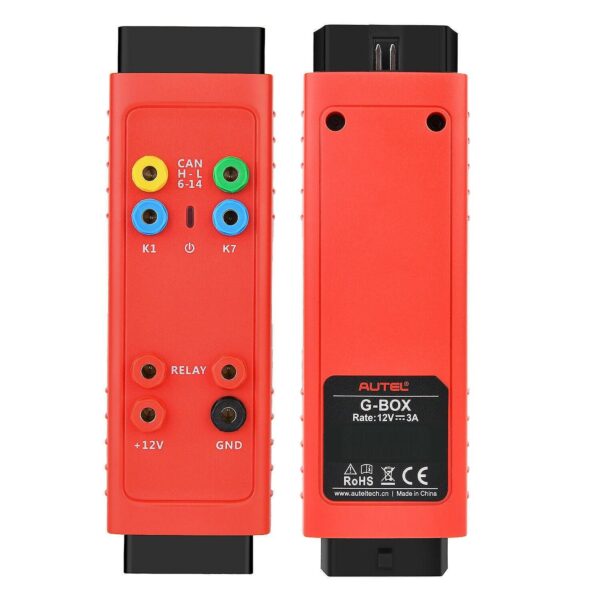
Description Autel G-Box – Professional Accessory Tool for Mercedes-Benz and BMW The Autel G-Box is specifically designed for working with Mercedes-Benz vehicles equipped with DAS3 CAN EIS/EZS systems when all keys are lost. It significantly accelerates password calculation and ECU data reading. Additionally, the G-Box supports working with BMW DME/DDE ISN data in Boot Mode, making it an essential tool for professionals. Key Features of the Autel G-Box ✅ Faster Password Calculation for Mercedes-Benz�� 8x faster for EIS models such as W172, W204, and W207.�� 4x faster for EIS models such as W209 and W211. ✅ No Repeated Use of the IR Simulator�� No need for repeated insertion and removal of the IR simulator for certain models (e.g., W164/-2008, W251/-2008). ✅ Direct Vehicle Key Programming�� For most Mercedes-Benz models, key programming can be done directly on the vehicle without removing the EIS. ✅ BMW Support�� Reads and writes DME/DDE ISN data in Boot Mode.�� Supports 23 categories of Bosch engines and 6 categories of Siemens/Continental engines. ✅ Time-Saving�� Reduces ECU data reading time by over 85% for W204 and W207 EIS. Compatibility ✔ Works with Autel MaxiIM IM608 and IM508 (XP400 required).✔ Supports Auro IM600 and IM100 with XP400.✔ Suitable for Mercedes-Benz models with DAS3 EIS/EZS after 2009. Technical Specifications DC Connector: 12V power supply CAN-H and CAN-L Ports: Universal CAN-Bus interfaces K1 and K7 Ports: Universal K-Line interfaces Status Indicator: Displays current operational state OBDII Connector: Connects to the vehicle’s OBDII port DB15 Port: For reading and writing ECU data using dedicated cables Autel G-Box Applications 1. OBDII Operation �� Ideal when all keys are lost (e.g., Mercedes W204, W207, W216, W164). Connection Steps:�� Connect G-Box to the vehicle’s OBDII port.�� Remove the EIS fuse and connect relay terminals using the fuse cable.�� For older vehicles, connect K7 and ELV connectors using a K-Line cable.�� Pair G-Box with the Autel diagnostic tablet. 2. Desktop Operation �� For all Mercedes-Benz EIS models supported by Autel diagnostic tablets. Connection Steps:�� Connect G-Box to the EIS unit via the DB15 cable.�� Use a 12V DC power supply to power the G-Box.�� Connect G-Box to the Autel diagnostic tablet. Package Contents �� 1× Autel G-Box Accessory Tool�� 1× Clamp Cable�� 1× K-Line Cable�� 1× Fuse Cable�� 1× OBDII Extension Cable�� 1× DB15 Cable Why Choose the Autel G-Box? ✅ Time and cost-efficient solution for Mercedes-Benz and BMW vehicles.✅ Faster password calculation for Mercedes-Benz models.✅ User-friendly operation with minimal steps for setup.✅ Broad compatibility with Autel and Auro diagnostic tools. �� Autel G-Box – A Must-Have Tool for Automotive Technicians and Locksmiths! ����
Related products
-

 GPS Snelheidsmeter 60 knopen Uflex Ultra Zwart 85mm This product has multiple variants. The options may be chosen on the product page
 -
 GPS Snelheidsmeter 60 Knopen 85mm Uflex Ultra Wit 12/24V This product has multiple variants. The options may be chosen on the product page
 -
Toerentalmeter met Uurmeter Uflex Ultra Zwart 8000rpm 85mm This product has multiple variants. The options may be chosen on the product page